



Sprunki Grown Up
report

More games like Sprunki Grown Up

Sprunki Grown Up

Sprunki Grown Up is the human form take on the Sprunki mixer that I keep reaching for when the blob cast starts to feel samey. You still drag icons onto a stage and layer loops, but the performers begin as seven blank gray adults on a bright outdoor set: green hills, trees, and a waterfall in the back. Drop a tray icon on a blank and that slot wakes up as a clothed, humanized character with its own sound. Jackets, hoodies, tank tops, suits, beanies, and sharper body language do most of the storytelling while you mix by ear.

We added Sprunki Grown Up because a lot of players ask for a redesign that feels older without flipping into horror. This one answers with daylight and fashion more than scare toggles. Soft and shy stacks sit next to loud spiky ones. Robot helmet looks sit somewhere in the middle. You do not need music theory. You need curiosity about who looks right standing next to whom.

The build we carry credits Me_scratch555 along the bottom edge. That matches the handmade UI details I notice every time I open it: wooden top bar, notebook button, gold G mark, and a refresh control on the right. Dress a few blanks, listen through a loop, then keep swapping until the outdoor band feels worth another run.

How to Play Sprunki Grown Up

1
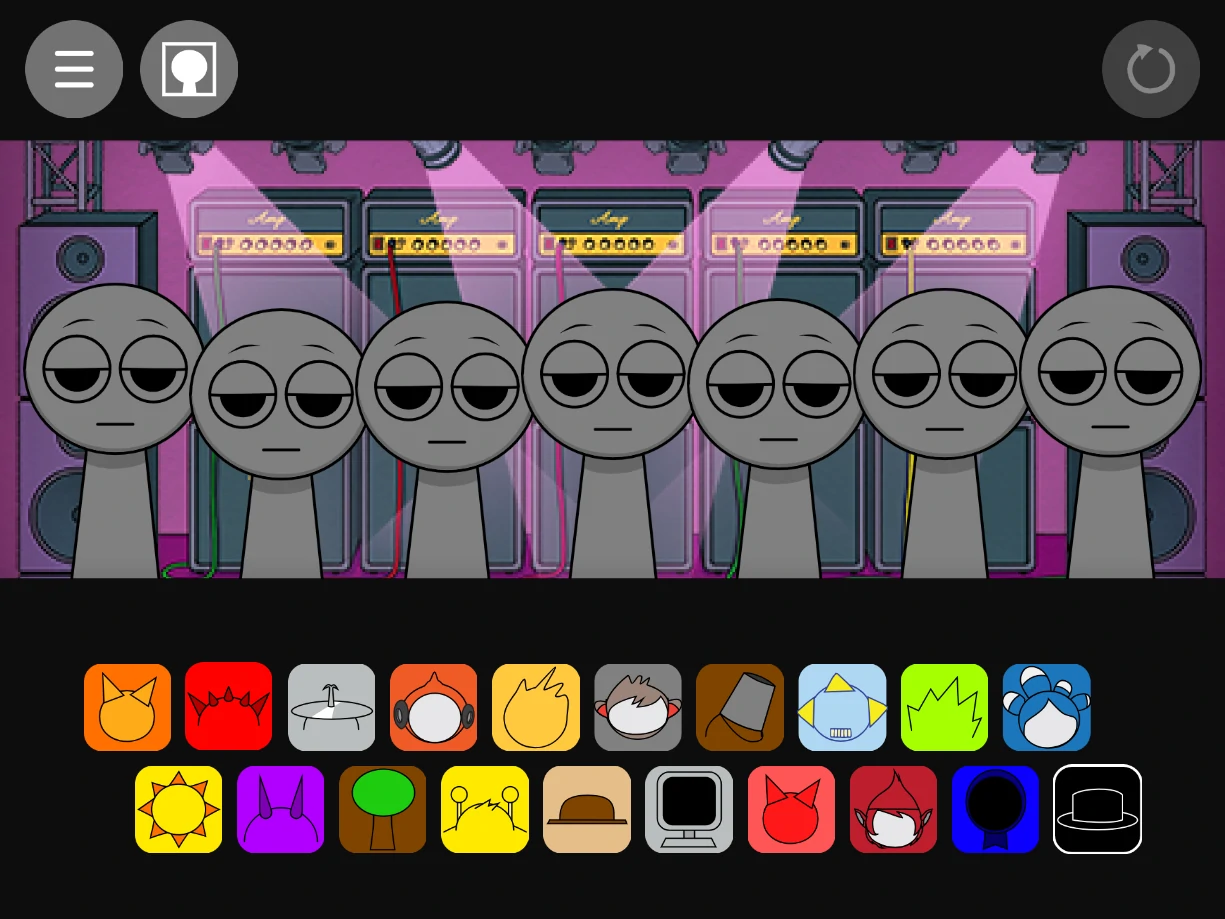
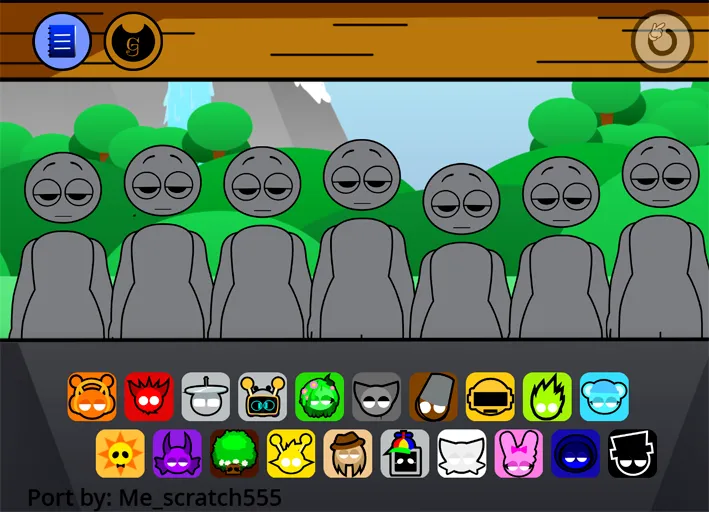
Blank gray figures and 20 icons on the Sprunki Grown Up stage

Drag a tray icon onto a blank gray figure

Open Sprunki Grown Up and look at the bottom tray of 20 icons. Click one and drop it onto a blank gray figure on the outdoor stage. That slot becomes a humanized performer and starts its sound loop right away.

2
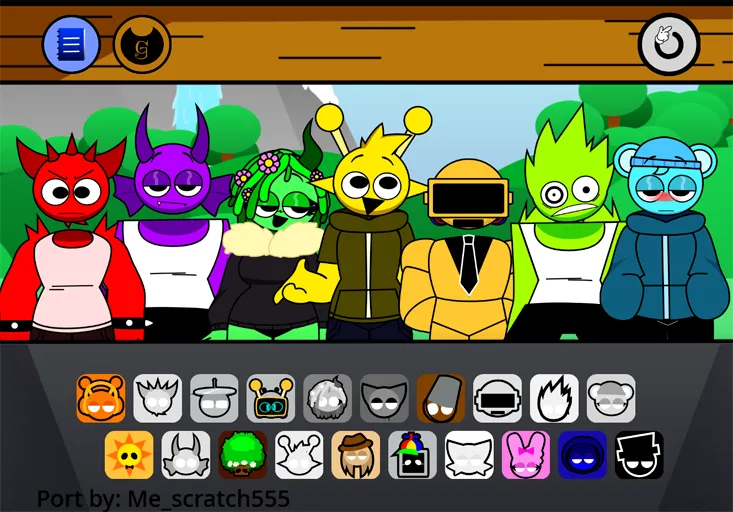
Humanized Sprunki Grown Up characters performing outdoors

Fill more slots to grow the full mix

Keep dressing empty figures until the outdoor band feels complete. I usually start with one calm beat and one melody, then add a vocal or effect for color. Pull a character off the stage if that layer fights the rest of the mix.

3

Refresh and restack for a new vibe

Hit the refresh control on the top right when you want a clean stage. Start from a different tray icon each run so the band does not always open the same way. Keep the stacks that feel soft, bold, or weird enough to replay.

Human forms on a green outdoor stage

What sold me on Sprunki Grown Up is the first frame. You get daylight hills, trees, and a waterfall behind seven gray starters with tired half closed eyes and wider adult proportions. They wait shirtless and blank until you dress them. After a few drops the line turns into a colorful cast with real outfit choices: spiked tanks, flowered hair and fur collars, hoodies, suit and tie robots, beanies, and more.

That clothing detail is the real hook for me. You are not only assigning a beat or a vocal. You are casting who stands in the band. A shy blue hoodie figure next to a suited robot already tells a different story from two loud tank top characters side by side, even before you judge the audio. I like putting this title next to our other redesign heavy mods because the wardrobe does the explaining that a long feature list usually tries to do.

The wooden top bar and outdoor backdrop keep the session feeling grounded. Sprunki Grown Up is still a mixer, but it looks closer to a small outdoor concert than a toy tray. If you are tired of dark stages, this is one of the clearest palette changes we carry.
How I actually play the 20 icon tray

Twenty icons sit in two rows under the stage. Each one carries a face design and a sound role. Drop it on a blank slot and the figure transforms while the loop begins. Fill more slots and the track thickens into a full outdoor band. Refresh when a stack goes nowhere.

My first mix is usually slow. One steady rhythm for pulse. One mid range melody that does not fight it. Then one vocal or effect, listened through a full cycle before I crowd the rest of the stage. Because every icon also changes posture and outfit, I often judge the board by eye when my ears get tired. Characters that look like they would argue on stage often clash in the mix too. Characters that look like they belong in the same photo usually sit cleaner.

Different groups push different vibes without a separate genre menu. Soft hoodie and shy faces lean gentle. Spiky hair and loud tanks push harder edges. Robot and helmet looks often sit in a more mechanical middle. When people say Sprunki Grown Up has many styles, this is what they mean: you explore by restacking people, not by flipping a labeled genre switch.

On phones the same drag motion works, though the icons are small and worth a careful drop. I leave one blank figure empty when the mix starts to feel crowded. Seven slots is a maximum, not a checklist.

Who I recommend this mod for

I recommend Sprunki Grown Up to players who already like Incredibox style Sprunki mixing and want a fresh cast more than a new rulebook. Beginners still do fine: drag, listen, adjust. No prior music knowledge is required. If you came for scare toggles, this is the wrong shelf. The personality here is human forms, outdoor daylight, and outfit first mixing.

Some community pages talk about sharing mixes or hidden combo reactions. I treat those as extras rather than promises, because ports can differ and the screen itself does not advertise a big share panel. What stays consistent is the core loop: dress the gray blanks, layer the humanized sounds, and restack until the outdoor band clicks. If a stack suddenly feels more alive than the sum of its parts, I note which icons were live before I hit refresh.

We keep Sprunki Grown Up free in the browser with no account and no install. Give the game a short moment to finish loading before you judge the first sounds. A five minute session is enough to hear whether the human cast clicks for you. Longer runs come from opening with tray icons you skipped on the first pass.

Editor notes, plus similar games I would open next

Build the band the way you would cast a photo. Start with one clear lead look, then add supporting outfits that do not steal the same visual job. If the mix turns muddy, pull the newest character off and decide whether that person belongs before you blame the whole stage. When a run goes stale, refresh and open with a vocal or odd helmet icon instead of the first beat in the tray. The outdoor stage still works when the first sound is soft or strange.

If the humanized cast worked for you, here are a few more I recommend from our collection. Sprunki Scratch shares that handmade, port friendly feel. Sprunki Retake is another redesign forward mixer if you like seeing familiar roles in new bodies. Sprunki Swapped flips identities across the cast for a different kind of character twist. Sprunki Modded is a comfortable community edit when you want classic mixing with fresh polish. Sprunki OC V3 goes wider on original character energy if one humanized roster is not enough.

FAQs about Sprunki Grown Up

Sprunki Grown Up is a Sprunki music mod that reimagines the cast in human forms. You drag icons onto blank gray figures on an outdoor stage to dress performers and layer loops into a full mix. It plays free in the browser.
Pick icons from the bottom tray and drop them onto the seven blank stage figures. Each placement starts a sound loop and turns that blank into a humanized character. Keep stacking, pull characters off to reshape the mix, or hit refresh for a clean stage.
No. If you can drag an icon and listen through a loop, you can build a mix. Beginners and regulars both do fine here.
The main difference is the humanized cast and outdoor stage. Familiar drag and drop mixing stays in place, while outfits, faces, and body language do the visual storytelling that blob casts usually leave abstract.
Yes, by restacking characters. Soft, bold, mechanical, and oddball icons push the mix toward different vibes without a separate genre screen.
Some Sprunki builds include share or copy tools. Use whatever export options appear in your session. The core fun of Sprunki Grown Up is still dressing the outdoor band and finding stacks you like.
Yes. We offer Sprunki Grown Up free with no account or download required. Open it in your browser and start mixing.